

Project Overview
Select overseas short drama promotion on the platform, download available materials, and create content with the promotion link on the right side of the drama download page, guiding users to download the streaming app and watch episodes.Region and IP Selection
“Local dramas” are foreign dramas performed by foreign actors; “translated Chinese dramas” are Chinese dramas performed by Chinese actors with foreign-language dubbing.
- The drama language determines the account region. English dramas fall into local dramas and translated Chinese dramas.
- Europe and North America have stronger paying capacity; choose US or European IPs and prioritize promoting local dramas.
- Japan, Korea, and Southeast Asia have large user bases; choose IPs based on language and target region.
- For example, a US-region account should mainly post local dramas instead of mixing in Thai dramas or content in other languages.
IP Change Rules
If you need to change the drama language, adjust the region and IP accordingly, but do not switch frequently. Using a phone as an example:- Turn on airplane mode
- Sign out of the account
- Wait a few hours, then switch the IP
- Turn off airplane mode and sign in again
Account Registration
Preparation
Choose between a pre-registered account, self-registration, or a BM setup based on your launch timeline, available resources, and management approach. Whichever you choose, prepare a stable device and network environment first, so the account does not trigger risk control right after takeover or registration. Materials:- Email: prepare 2-3 email addresses that are not banned by Facebook and can receive email long-term. Use them to create accounts when self-registering, or to complete security information when taking over a pre-registered account.
- Phone number: for self-registration, use a number that has never been registered on Facebook — a domestic number, an overseas physical SIM, or an overseas virtual number; for overseas physical SIMs, see MollySim.
- Network: use a clean, stable IP whose region matches the target account region.
- Devices: prepare 2 phones, Android or iPhone; Android 14+ or iOS 17+ is recommended. After taking over a pre-registered account, keep the device and browser environment fixed as well.
- Admin account: handles permission assignment, Page creation, and management.
- Operation account: handles content management and community operations.
Registration Options
Choose one of the three approaches based on your timeline, existing resources, and management needs:Option 1: Buying a Pre-registered Account
Suitable for users who want to lower the barrier of account preparation, shorten registration and initial setup, and move quickly into Page creation and content operations. AiToEarn may provide Facebook pre-registered accounts that have completed basic registration, subject to actual service availability. Please read the following in full before scanning the QR code to contact support and purchase a pre-registered account!Pre-registered Account Delivery and Risk Disclosure
A pre-registered account helps you save the time of self-registration, verification, and initial setup. It is not an officially certified Facebook / Meta account, and it does not replace subsequent environment management, warm-up, and compliant operations.- The account status usually only reflects usability at delivery or within the agreed acceptance period. Complete the first sign-in, basic function checks, security information, and agreed delivery items within the acceptance period; replacement, refund, or other after-sales handling follows the actual service agreement.
- AiToEarn cannot promise the permanent stability, permanent availability, or permanent ban-free status of any account, nor any traffic, orders, monetization ability, or operating revenue.
- After delivery, the IP, device, browser fingerprint, time zone, language, login method, operation frequency, binding changes, authorization connections, and content behavior all affect subsequent stability.
- Due to Meta platform rule changes, system risk control, security checks, network environment changes, improper operations, or content violations, an account may face re-verification, throttling, feature restrictions, sign-in failure, authorization failure, publishing failure, or bans.
- AiToEarn may provide account delivery, basic usage guidance, and necessary troubleshooting subject to the actual service agreement, but cannot intervene in or guarantee Meta’s review results or risk control decisions.
- Facebook / Meta has platform rules on account access, password sharing, account transfer, abnormal logins, and content publishing; you should understand and comply with the relevant terms of service and applicable laws and regulations.
Option 2: Registering a New Account
Suitable for users who value full control over registration history and are willing to complete registration, verification, and early warm-up from scratch. If you cannot register Facebook directly in your region, you can register through the AiToEarn Cloud Workspace.- Open a browser or AiToEarn Cloud Workspace, enter https://www.facebook.com in the address bar, and click Create new account.
- Fill in your name and email; the email must be able to receive verification codes and remain usable long-term.
- Open the email you just entered, get the latest verification code, fill it in, and click continue.
- After creation, you are taken directly to the new account’s home page.
- Complete the basic profile: add an avatar and bio as prompted, or skip and fill them in later on your profile page.
- Confirm account security: after registration, go to Settings & privacy - Settings - Password and security, bind an email and phone number, and enable two-factor authentication.
- Warm up the account for 7-14 days first: browse content and complete the profile as needed, avoiding concentrated repeated following, friend requests, or mass messaging in a short period.
- After warm-up, create your Page.
During warm-up, use the account 10-20 minutes a day across 2-3 sessions; browse videos randomly and like sparingly. Avoid frequent clicking, direct messages, or abnormal operations.
Option 3: BM Account Setup
Suitable for teams that already have multiple Facebook personal accounts and need to centrally manage Pages, staff permissions, and business assets.- Open business.facebook.com.
- Use 1 Facebook personal account to create a BM account.
- In the BM dashboard, create an asset portfolio and bind another Facebook account as the operating entity.
- Follow the new-account registration flow to create Pages and complete authorization.
Required Steps After Registration
Account linking: Authorize all Pages to 1 admin account, and keep 1-2 additional operation accounts in reserve, so a single account issue does not affect all Pages. Page initialization: Upload an avatar and cover image, and complete the About section. The avatar should fit film/TV characters or drama posters, the cover image should match the account positioning, and the Page description can briefly explain the content direction. Account warm-up: After registration, keep 10-15 minutes of normal browsing every day; browse vertical content and follow quality accounts of the same type.Device and Environment Management
Device rules:- Registration stage: register on mobile only. For new devices, factory-reset first to avoid device-ID issues; web registration is more likely to trigger risk control or fail to receive verification messages.
- Operation stage: manage content on the web, and use the BM dashboard for admin work to reduce account-linking risk.
- Stable IP: always use the target region IP and avoid frequent switching.
- IP check: confirm the IP is not flagged as risky by Facebook; you can check with ping0.cc.
- Browser isolation: use a fingerprint browser (such as AdsPower) to create an isolated environment for each account, preventing cross-account association.
Account Warm-up and Operations
Within 7 days of registration, keep each account browsing normally for 15-20 minutes a day, split into 1-2 sessions.- Browse recommended videos on the home feed; search vertical tags such as Drama.
- Like and comment on relevant content sparingly; avoid meaningless interactions.
- Follow 2-3 quality accounts in the same niche.
Performance Benchmarks
Content Publishing Rules
Publishing entity:- Prefer Pages, which better support the “content - followers - conversion” chain.
- Personal profiles are not recommended: traffic is unstable and unfavorable for long-term operations.
- Drama introduction
- Promotion link
- Plot summary
- Content tags
- Sign in to an operation account that has an authorized Page.
- Open the Page dashboard and click Create post.
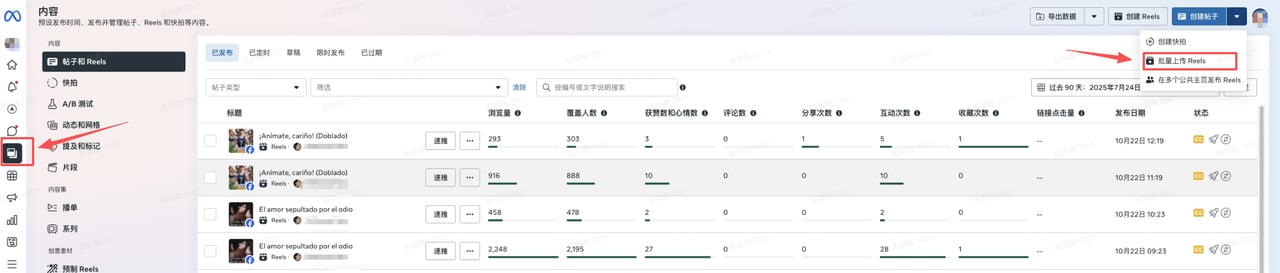

- Upload videos — publish one by one, or batch publish in the content options.
- Complete titles, descriptions, promotion links, episode introductions, tags, and publish times in batch.
- Click Publish, or set Scheduled publishing 1 day in advance.
Short drama content is mainly long-video posts. Reels only supports videos up to 90 seconds; for batch publishing, prefer posts as long as long videos publish normally.
- Authorize all Pages to 1 admin account to centralize permissions and avoid losing accounts.
- Grant operation accounts content-publishing permission only; do not grant settings modification, to reduce misoperation risk.
- Go to Settings - Security and login and bind a phone number, email, and WhatsApp to increase account trust.
- Reply to commenters promptly after publishing, and invite engaged users to follow the Page.
- Later, in the BM dashboard’s Page recommendations, invite users who viewed content or follow similar Pages to follow your Page.
- Content frequency: publish 10-20 posts per day to keep the account active.
- Content selection: in the early stage, prioritize newly released local dramas, hit dramas, and translated dramas each day.
Do not use KalosTV materials with copyright risk, to avoid affecting revenue or Page stability.
- Method 1: open with the most attractive scene — edit a 3-5 second high-energy clip, then splice in free materials; prepare at least 10 clips per drama.
- Method 2: open with a high-view clip, film material, or borderline material, then splice in the promoted drama material to improve first-seconds retention.
- New accounts should splice free materials with refined editing instead of posting long videos. If short videos get no traffic in the early stage, switch to 10-20 minute long videos.
- IP risk: sign in to no more than 3 accounts under the same IP; isolate multiple accounts with a fingerprint browser.
- Content risk: check material copyright before publishing; pre-check with Facebook’s material review tools.
- Account bans: if an account is banned, appeal with the admin account first and complete face verification; if it cannot be recovered, switch accounts in time and keep spare accounts in reserve.
Handling Account Issues
Editing Short Drama Videos
Learn the basics of CapCut (Jianying) with the tutorials below, or search for similar editing tutorials yourself. CapCut basic editing tutorial CapCut advanced editing tutorialVideo Creation Tips
Common editing formats are listed below; in the mid-term, learn more editing styles by benchmarking quality accounts:Copyright riskWhen adding narration subtitles and background music, watch out for music and font copyright. Use royalty-free music and fonts, or make sure you have obtained legal usage rights.
Editing Requirements
The first 3-5 seconds decide whether viewers stay; include at least 1 type of high-energy element:
Notes:
- Avoid panoramic slow shots in the first 5 seconds.
- Avoid linear narration; prefer flashbacks or intercutting.
- Do not rely on text-only narration; let the visuals deliver the hook directly.
- Avoid merging multiple raw episodes into one long video — it hurts completion rate and distribution.
- Do not repost raw footage directly; re-edit, cut redundant content, and distill the core highlights.