> ## Documentation Index
> Fetch the complete documentation index at: https://docs.aitoearn.ai/llms.txt
> Use this file to discover all available pages before exploring further.
# Claude Desktop 设置
> 配置 Claude Desktop 使用 AiToEarn Anthropic 兼容接口
Claude Desktop 支持配置第三方推理服务。配置 AiToEarn 后,Claude Desktop 会通过 AiToEarn 的 Anthropic 兼容接口发起请求,并使用你的 AiToEarn API Key 完成鉴权。
该功能需要较新的 Claude Desktop 客户端。旧版本可能看不到 `Developer` 菜单或第三方推理配置入口。
AiToEarn 的 API Key 对应 `ANTHROPIC_API_KEY` / `x-api-key` 认证方式,不是 `ANTHROPIC_AUTH_TOKEN`。如果界面要求选择认证方式,请选择 `x-api-key`。
## 前置条件
开始之前,请确认你已经准备好:
1. 最新版 Claude Desktop 客户端。
2. AiToEarn 账户。
3. [AiToEarn API Key](/zh/use/api-key)。
## 选择 Base URL
AiToEarn 的 API Key 与站点绑定。Claude Desktop 中填写的 Base URL 必须和 API Key 所属站点一致。
| 站点 | Base URL |
| --- | ---------------------------- |
| 国内版 | `https://aitoearn.cn/api/ai` |
| 国际版 | `https://aitoearn.ai/api/ai` |
不要填写 `/v1/messages`。Claude Desktop 会按 Anthropic Messages 格式请求,最终命中 AiToEarn 的 [Anthropic 对话接口](/api-reference/post-api-ai-v1-messages)。
## 配置步骤
建议在登录 Claude Desktop 之前完成以下配置。
1. 打开最新版 Claude Desktop 客户端。
2. 先不要登录。
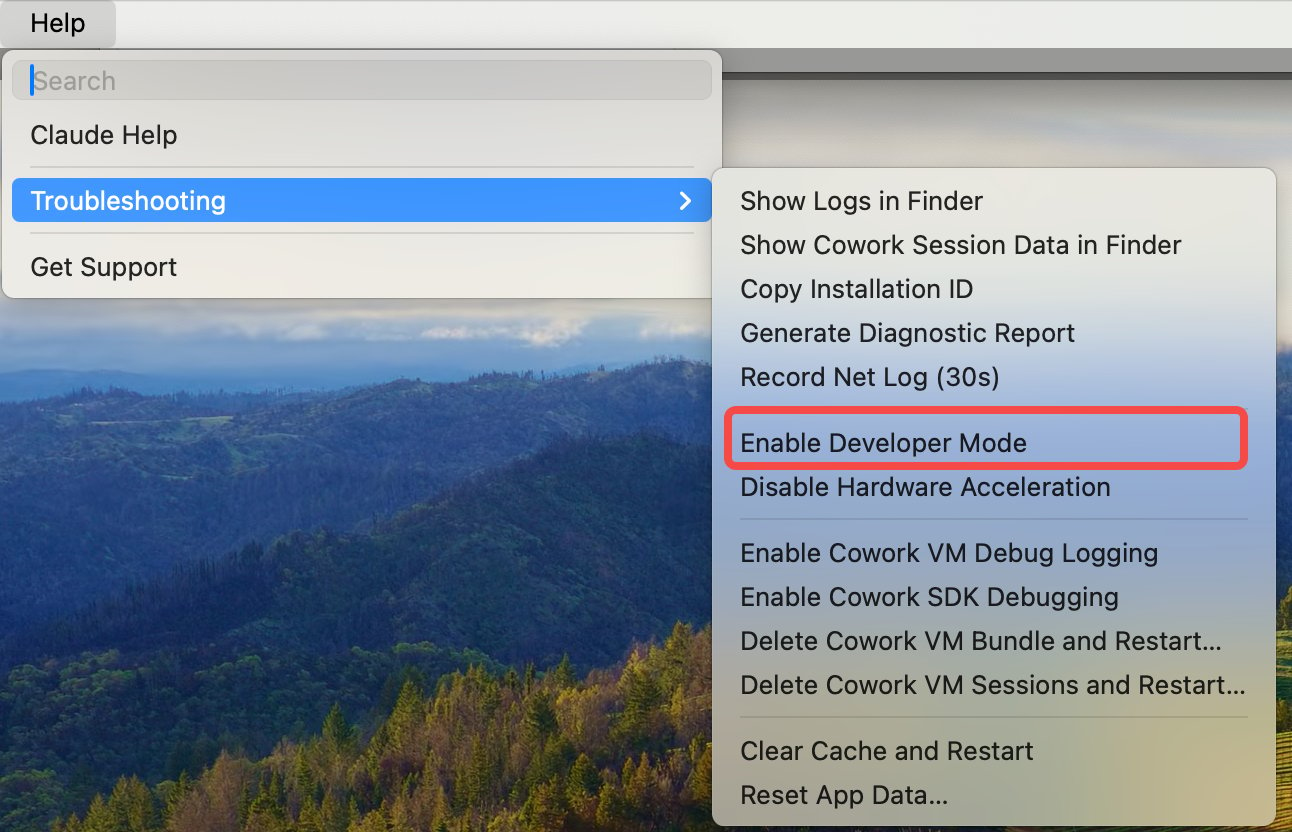
3. 在顶部菜单栏进入 `Help` → `Troubleshooting` → `Enable Developer Mode`,启用开发者模式。
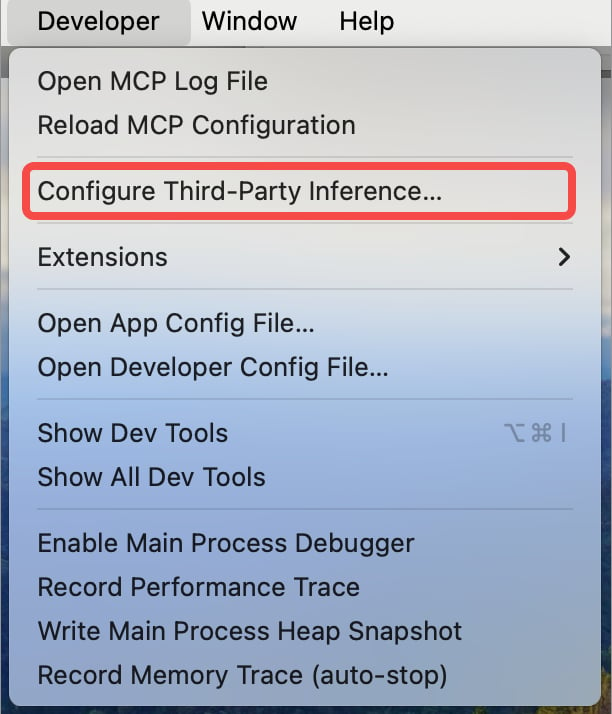
 启用后,菜单栏会出现 `Developer` 菜单。进入 `Developer` → `Configure third-party inference`。
 在第三方推理配置中填写:
| 字段 | 填写内容 |
| --------------------- | ------------------------------------------------------------------- |
| Base URL | 国内版填 `https://aitoearn.cn/api/ai`,国际版填 `https://aitoearn.ai/api/ai` |
| API Key | 你的 AiToEarn API Key |
| Authentication method | 选择 `x-api-key` |
| Provider / API format | 如界面出现该选项,选择 `Anthropic-compatible`、`custom gateway` 或类似选项 |
在第三方推理配置中填写:
| 字段 | 填写内容 |
| --------------------- | ------------------------------------------------------------------- |
| Base URL | 国内版填 `https://aitoearn.cn/api/ai`,国际版填 `https://aitoearn.ai/api/ai` |
| API Key | 你的 AiToEarn API Key |
| Authentication method | 选择 `x-api-key` |
| Provider / API format | 如界面出现该选项,选择 `Anthropic-compatible`、`custom gateway` 或类似选项 |
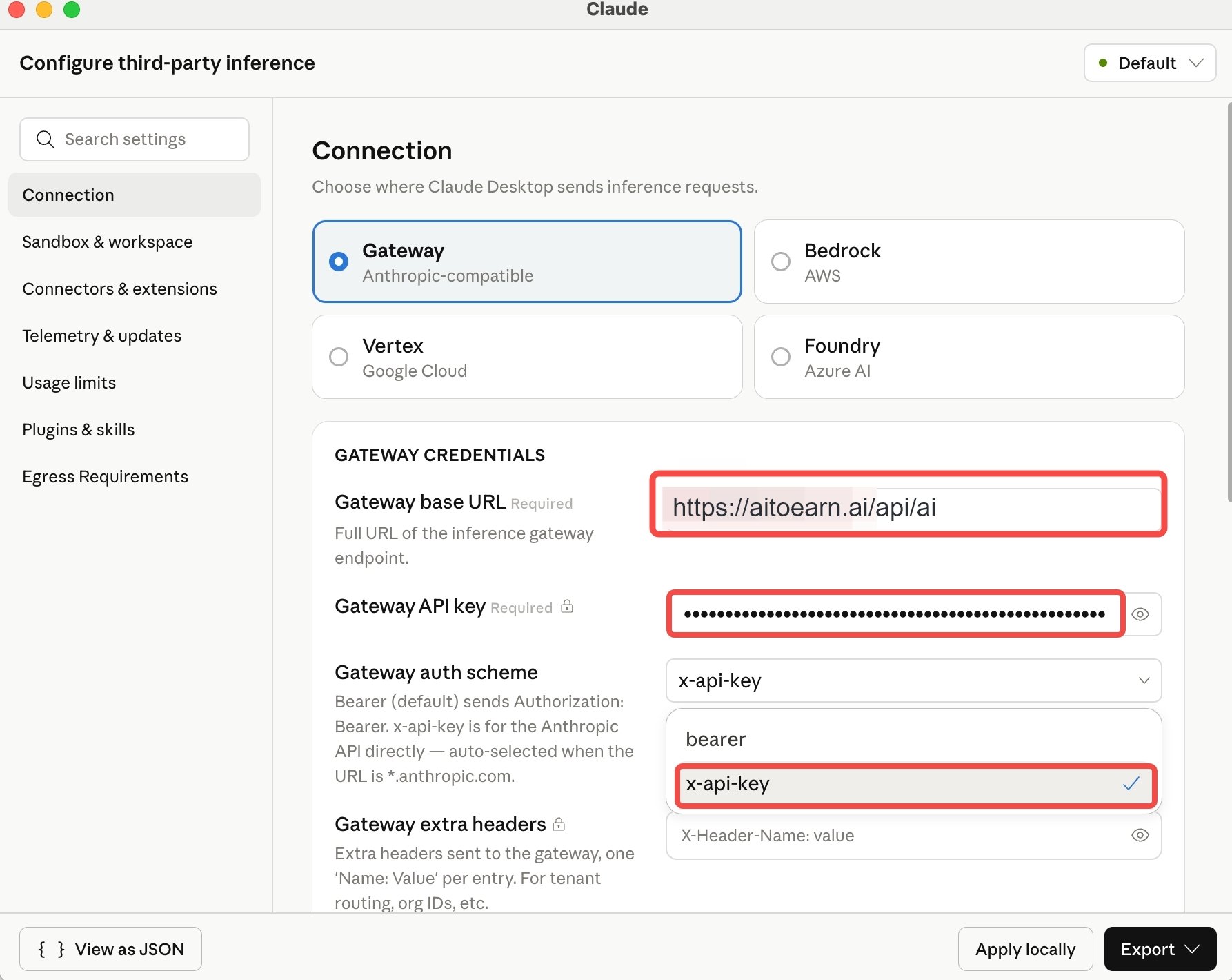 选择 `Apply locally`,将配置保存到当前电脑。
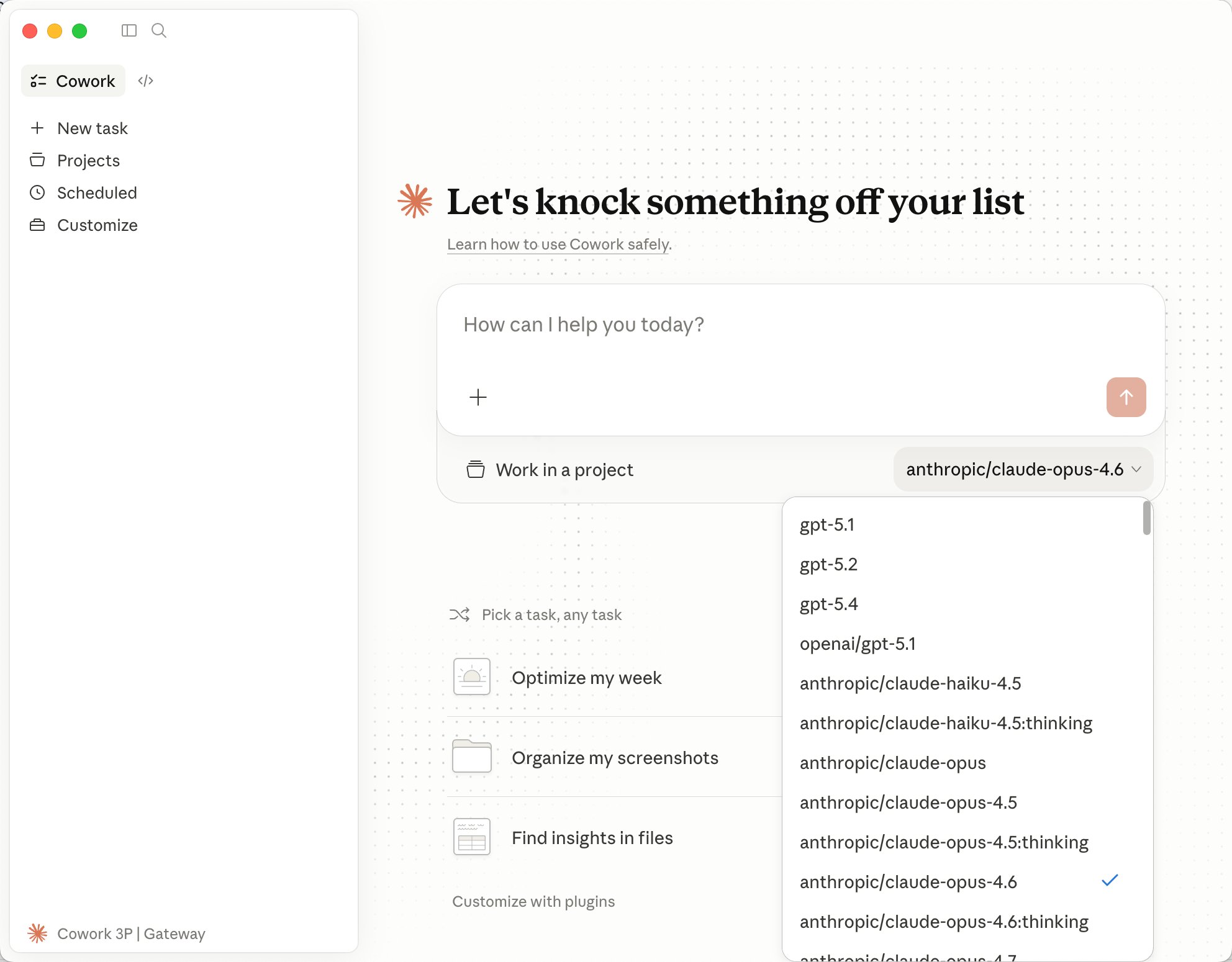 按客户端提示继续登录或重启 Claude Desktop。
## 验证配置
应用本地配置后:
1. 如果客户端提示重启,先完全退出并重新打开 Claude Desktop。
2. 新建一个对话。
3. 发送一个简单测试问题,例如:
```text theme={null}
如果当前请求正在使用 AiToEarn,请用一句话回复。
```
如果可以正常返回结果,说明 Claude Desktop 已经通过 AiToEarn 发起请求。
接入成功后,你可以在 Claude Desktop 中切换 AiToEarn 平台上的可用模型。当前模型列表以 [对话模型列表](/api-reference/get-api-ai-models-chat) 为准。
## 常见问题
### 看不到 Developer 菜单
* 确认已安装最新版 Claude Desktop。
* 从 `Help` → `Troubleshooting` → `Enable Developer Mode` 启用开发者模式。
* 启用后完全退出并重新打开 Claude Desktop。
### 找不到 Configure third-party inference
* 确认使用的是 Claude Desktop 客户端,不是网页端。
* 尝试在登录前打开客户端并启用开发者模式。
* 更新 Claude Desktop 后重新操作。
### API Key 无效
* 从 [AiToEarn API Key 页面](/zh/use/api-key) 复制完整 API Key。
* 检查 API Key 前后是否有多余空格。
* 确认认证方式选择的是 `x-api-key`。
* 不要使用 `ANTHROPIC_AUTH_TOKEN`。
### 连接失败或模型错误
* 国内版 Base URL 严格填写为 `https://aitoearn.cn/api/ai`。
* 国际版 Base URL 严格填写为 `https://aitoearn.ai/api/ai`。
* 确认 Base URL 和 API Key 属于同一站点。
* 如果 Claude Desktop 提供模型选择,可以切换到 [对话模型列表](/api-reference/get-api-ai-models-chat) 中返回的其它可用模型再测试。
按客户端提示继续登录或重启 Claude Desktop。
## 验证配置
应用本地配置后:
1. 如果客户端提示重启,先完全退出并重新打开 Claude Desktop。
2. 新建一个对话。
3. 发送一个简单测试问题,例如:
```text theme={null}
如果当前请求正在使用 AiToEarn,请用一句话回复。
```
如果可以正常返回结果,说明 Claude Desktop 已经通过 AiToEarn 发起请求。
接入成功后,你可以在 Claude Desktop 中切换 AiToEarn 平台上的可用模型。当前模型列表以 [对话模型列表](/api-reference/get-api-ai-models-chat) 为准。
## 常见问题
### 看不到 Developer 菜单
* 确认已安装最新版 Claude Desktop。
* 从 `Help` → `Troubleshooting` → `Enable Developer Mode` 启用开发者模式。
* 启用后完全退出并重新打开 Claude Desktop。
### 找不到 Configure third-party inference
* 确认使用的是 Claude Desktop 客户端,不是网页端。
* 尝试在登录前打开客户端并启用开发者模式。
* 更新 Claude Desktop 后重新操作。
### API Key 无效
* 从 [AiToEarn API Key 页面](/zh/use/api-key) 复制完整 API Key。
* 检查 API Key 前后是否有多余空格。
* 确认认证方式选择的是 `x-api-key`。
* 不要使用 `ANTHROPIC_AUTH_TOKEN`。
### 连接失败或模型错误
* 国内版 Base URL 严格填写为 `https://aitoearn.cn/api/ai`。
* 国际版 Base URL 严格填写为 `https://aitoearn.ai/api/ai`。
* 确认 Base URL 和 API Key 属于同一站点。
* 如果 Claude Desktop 提供模型选择,可以切换到 [对话模型列表](/api-reference/get-api-ai-models-chat) 中返回的其它可用模型再测试。