> ## Documentation Index
> Fetch the complete documentation index at: https://docs.aitoearn.ai/llms.txt
> Use this file to discover all available pages before exploring further.
# Publish with the extension
> Publish to Xiaohongshu, WeChat Channels, and Douyin with the AiToEarn browser extension.
The AiToEarn browser extension reuses the platform sessions in the current browser so your web app can publish directly to Xiaohongshu, WeChat Channels, and Douyin. Users do not need to copy cookies.
| Platform | `platform` | Video | Image post | Main requirements |
| --------------- | ---------- | --------- | ------------------------- | -------------------------------------------- |
| Xiaohongshu | `xhs` | Supported | Supported, up to 9 images | A cover is required for video |
| WeChat Channels | `wxSph` | Supported | Not currently supported | A cover is required |
| Douyin | `douyin` | Supported | Supported, 1–35 images | Title: 30 characters; body: 1,000; topics: 5 |
You can first download and run the [Open Platform
demo](https://ai-to-earn.oss-cn-beijing.aliyuncs.com/comment/assets/open-platform-demo.zip).
Switch to **Browser extension** at the top of the page, then follow this
guide.
## 1. Install the extension
Follow the [extension installation guide](https://aitoearn.ai/en/websit/plugin-guide) to install the AiToEarn browser extension.
## 2. Choose Authorize Only
Open the extension sidebar and select **Authorize Only**. Users do not need to sign in to an AiToEarn web account in this mode.
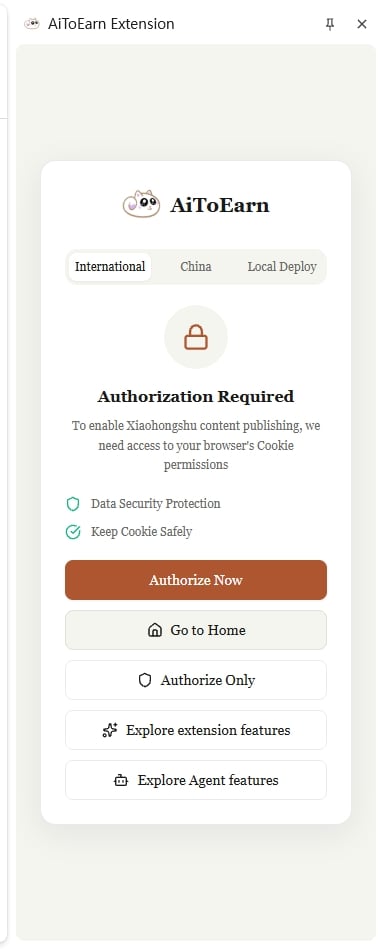 `Authorize Only` skips the AiToEarn web-account sign-in; it does not disable
the Web API. After you authorize the web origin in the next step, that origin
can call `login()`, `publish()`, and the helper methods listed on this page.
## 3. Configure an injectable domain
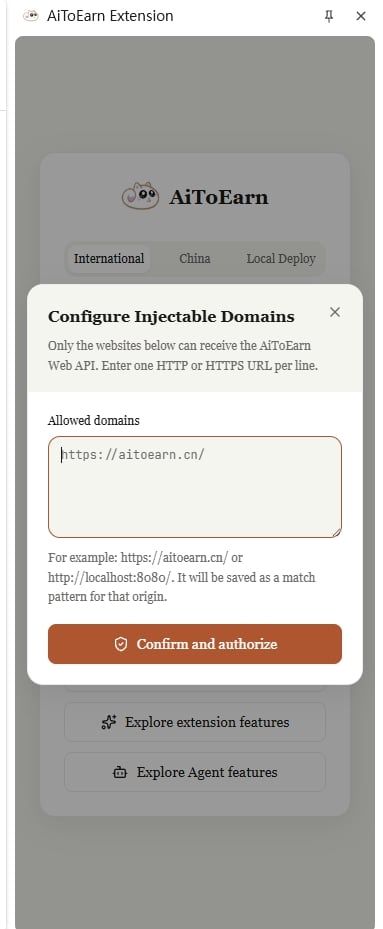
Under **Allowed domains**, enter the origin of the web page that will call the extension. For the local demo, enter:
```text theme={null}
http://localhost:5173/
```
For a deployed app, use its actual origin, such as `https://demo.example.com/`. Enter one HTTP or HTTPS URL per line.
Enter your demo or web-app origin, not a Xiaohongshu, WeChat Channels, or
Douyin URL. The extension stores an origin match pattern, so
`http://localhost:5173/` becomes `http://localhost:5173/*`. Only add origins
you trust.
Select **Confirm and authorize**, then refresh the web page so the extension can inject `window.AIToEarnPlugin`.
`Authorize Only` skips the AiToEarn web-account sign-in; it does not disable
the Web API. After you authorize the web origin in the next step, that origin
can call `login()`, `publish()`, and the helper methods listed on this page.
## 3. Configure an injectable domain
Under **Allowed domains**, enter the origin of the web page that will call the extension. For the local demo, enter:
```text theme={null}
http://localhost:5173/
```
For a deployed app, use its actual origin, such as `https://demo.example.com/`. Enter one HTTP or HTTPS URL per line.
Enter your demo or web-app origin, not a Xiaohongshu, WeChat Channels, or
Douyin URL. The extension stores an origin match pattern, so
`http://localhost:5173/` becomes `http://localhost:5173/*`. Only add origins
you trust.
Select **Confirm and authorize**, then refresh the web page so the extension can inject `window.AIToEarnPlugin`.
 ## 4. Detect the extension and read the platform account
Check the global object, version, and permissions before reading the platform session from the current browser:
```js theme={null}
const plugin = window.AIToEarnPlugin;
if (!plugin) {
// Your product should link to this guide instead of continuing
throw new Error("AiToEarn browser extension was not detected");
}
const [{ version }, permission] = await Promise.all([
plugin.getVersion(),
plugin.checkPermission(),
]);
if (!permission.granted) {
throw new Error(permission.error || "The extension is not authorized");
}
const account = await plugin.login("xhs");
// Keep only the account summary that your UI needs
const accountSummary = {
type: account.type,
uid: account.uid,
account: account.account,
avatar: account.avatar,
nickname: account.nickname,
fansCount: account.fansCount,
};
console.log("Extension version", version);
console.log("Current account", accountSummary);
```
`login(platform)` means “get the sign-in information for this publishing
platform.” It does not sign in to AiToEarn or open a platform login form. The
user must already be signed in to the target platform in the same browser. The
Promise rejects if the platform session is missing or expired.
The raw `login()` response contains `loginCookie`. This is sensitive data. Do
not display, log, persist, or send it to a third party. If you only need to
show the account, immediately map the response to a summary containing fields
such as nickname, avatar, and UID, as shown above.
## 5. Publish content
The following example publishes a local video to Xiaohongshu and receives download, upload, and publishing progress:
```js theme={null}
const result = await window.AIToEarnPlugin.publish(
{
platform: "xhs",
type: "video",
title: "Today's creation log",
desc: "This post was published through the browser extension.",
video: videoFile,
cover: coverFile,
topics: ["CreationLog"],
visibility: "public",
},
(event) => {
console.log(event.stage, event.progress, event.message);
},
);
if (!result.success) {
throw new Error(result.failReason || "Publishing failed");
}
console.log("Work ID", result.workId);
console.log("Work URL", result.shareLink);
```
`video`, `cover`, and `images` accept either browser `File` objects or accessible HTTP/HTTPS URLs. Image-post example:
```js theme={null}
const result = await window.AIToEarnPlugin.publish(
{
platform: "douyin",
type: "image",
title: "Travel photos",
desc: "Views from today.",
images: [firstImageFile, "https://example.com/second-image.jpg"],
topics: ["Travel", "Photography"],
},
({ stage, progress }) => {
console.log(`${stage}: ${progress}%`);
},
);
```
The extension downloads URL-based media first. Make sure each URL is directly
accessible, has not expired, and can be fetched by the extension. Do not pass
local paths, private-network addresses, or URLs that require an authenticated
page session.
## Methods available in Authorize Only mode
After an injectable origin is configured, the following Web APIs are available in `Authorize Only` mode:
| Method | Purpose | Return value |
| ------------------------------- | --------------------------------------------------- | -------------------------------------- |
| `checkPermission()` | Check extension permissions | `Promise` |
| `getVersion()` | Get the extension version | `Promise` |
| `login(platform)` | Read and validate a platform session | `Promise` |
| `publish(params, onProgress?)` | Publish video or image content | `Promise` |
| `xhsSearchLocation(params)` | Search Xiaohongshu locations | `Promise` |
| `douyinSearchLocation(params)` | Search Douyin locations | `Promise` |
| `wxSphSearchLocation(params)` | Search WeChat Channels locations | `Promise` |
| `wxSphSearchActivity(params)` | Search WeChat Channels activities | `Promise` |
| `wxSphStartLinkPolling(params)` | Start polling for a WeChat Channels work URL | `Promise` |
| `douyinInteraction(params)` | Like, favorite, or comment on Douyin | `Promise` |
| `douyinDirectMessage(params)` | Send a Douyin direct message | `Promise` |
| `unifiedInteraction(params)` | Like, favorite, or comment on Xiaohongshu or Douyin | `Promise` |
## Basic method parameters and responses
### `checkPermission()`
This method takes no arguments and returns:
| Field | Type | Description |
| ------------- | --------------------- | ------------------------------------------------------- |
| `granted` | `boolean` | Whether the required extension permissions were granted |
| `permissions` | `string[]` (optional) | Granted permissions |
| `hostAccess` | `boolean` (optional) | Whether site access was granted |
| `error` | `string` (optional) | Error message when the check fails |
### `getVersion()`
This method takes no arguments and returns:
| Field | Type | Description |
| --------- | ------------------- | ------------------------------------ |
| `version` | `string` (optional) | Current extension version |
| `error` | `string` (optional) | Error message when the request fails |
### `login(platform)`
`platform` must be `xhs`, `wxSph`, or `douyin`. A successful call returns:
| Field | Type | Description |
| ------------------ | ------------------------------------------------ | ------------------------------------------------------ |
| `type` | `"xhs" \| "wxSph" \| "douyin"` | Platform identifier |
| `loginCookie` | `string` | Platform cookie; sensitive and not intended for app UI |
| `uid` | `string` | Platform user ID |
| `account` | `string` | Platform account |
| `avatar` | `string` | Avatar URL |
| `nickname` | `string` | Nickname |
| `fansCount` | `number` (optional) | Follower count |
| `xhsLoginStatus` | `{ home: boolean; creator: boolean }` (optional) | Xiaohongshu home and creator-studio session status |
| `wxSphLoginStatus` | `{ channels: boolean }` (optional) | WeChat Channels session status |
The Promise rejects with an `Error` on failure. Some errors also include `code` and `errorCode`.
## `publish()` parameters
Call signature:
```ts theme={null}
plugin.publish(params, onProgress?): Promise
```
`params` fields:
| Field | Type | Required | Description |
| ---------------- | ------------------------------------ | ------------------------------------- | ----------------------------------------------------------------------------------------- |
| `platform` | `"xhs" \| "wxSph" \| "douyin"` | Yes | Target platform |
| `type` | `"video" \| "image"` | Yes | Content type; WeChat Channels only accepts `video` |
| `title` | `string` | No | Title |
| `desc` | `string` | No | Body or description |
| `video` | `File \| string` | For video | Video file or URL |
| `images` | `(File \| string)[]` | For image posts | Image files or URLs |
| `cover` | `File \| string` | Xiaohongshu and WeChat Channels video | Cover file or URL |
| `topics` | `string[]` | No | Topic names without `#` |
| `location` | `LocationInfo` | No | Location; use the platform location-search method first |
| `visibility` | `"public" \| "private" \| "friends"` | No | Visibility; currently used by Xiaohongshu |
| `mentionedUsers` | `{ id: string; nickname: string }[]` | No | Mentioned users; currently used by Xiaohongshu |
| `scheduledTime` | `number` | No | Scheduled publish time as a millisecond timestamp; use according to platform capabilities |
| `platformConfig` | `object` | No | Platform-specific options |
`LocationInfo` has the following shape:
```ts theme={null}
interface LocationInfo {
id: string;
name: string;
poiType?: number;
address?: string;
simpleAddress?: string;
latitude?: number;
longitude?: number;
cityCode?: string;
cityName?: string;
}
```
Xiaohongshu declarations can be supplied in `platformConfig`:
```js theme={null}
platformConfig: {
originalStatement: true,
userDeclarationBind: {
// 1=virtual performance; 2=AI-generated content; 3=marketing or advertising
origin: 2,
},
}
```
### Platform differences
| Capability | Xiaohongshu | WeChat Channels | Douyin |
| ----------------------- | --------------------------------------- | --------------------------------------- | --------------------------- |
| `type: "video"` | Supported; `video` and `cover` required | Supported; `video` and `cover` required | Supported; `video` required |
| `type: "image"` | Supported, 1–9 images | Not supported | Supported, 1–35 images |
| Topics | Supported | Supported, up to 10 | Supported, up to 5 |
| Location search | `xhsSearchLocation()` | `wxSphSearchLocation()` | `douyinSearchLocation()` |
| Scheduled publishing | Do not rely on it | Supported | Supported |
| Visibility and mentions | Supported | Not supported | Not currently supported |
Platform rules may change. Show validation and publishing errors returned by the extension to the user instead of silently ignoring them.
## Publishing progress callback
`onProgress` receives a `ProgressEvent` on each update:
| Field | Type | Description |
| ----------- | -------------------------------------------------------------- | --------------------------------- |
| `stage` | `"download" \| "upload" \| "publish" \| "complete" \| "error"` | Current stage |
| `progress` | `number` | Progress percentage from 0 to 100 |
| `message` | `string` (optional) | Current progress message |
| `data` | `object` (optional) | Stage-specific data |
| `timestamp` | `number` (optional) | Event timestamp |
Stage-specific `data`:
| `stage` | `data` fields |
| ---------- | ------------------------------------------------------------ |
| `download` | `loaded`, `total`, and `speed?`; byte counts and bytes/s |
| `upload` | `loaded`, `total`, `chunkIndex?`, and `totalChunks?` |
| `publish` | `step`: `preparing`, `signing`, `submitting`, or `verifying` |
| `complete` | `workId`, `shareLink?`, and `platformData?` |
| `error` | `code?` and `error` |
## Publishing response
`publish()` resolves to a `PublishResult`:
| Field | Type | Description |
| -------------- | -------------------- | ------------------------------------------------------- |
| `success` | `boolean` | Whether publishing succeeded |
| `workId` | `string` (optional) | Platform work ID |
| `shareLink` | `string` (optional) | Work URL; some platforms may not provide it immediately |
| `publishTime` | `number` (optional) | Publish timestamp |
| `failReason` | `string` (optional) | Failure reason |
| `errorCode` | `string` (optional) | Failure code |
| `platformData` | `unknown` (optional) | Platform-specific data; validate its type before use |
Communication failures, timeouts, and some platform errors can reject the Promise directly. Handle both the result and `catch`:
```js theme={null}
try {
const result = await window.AIToEarnPlugin.publish(params, onProgress);
if (!result.success) {
showError(result.failReason || result.errorCode || "Publishing failed");
return;
}
showSuccess(result.shareLink);
} catch (error) {
showError(error.message || "Extension call failed");
}
```
## Location and WeChat Channels helpers
### Location search
```ts theme={null}
xhsSearchLocation({
keyword?: string;
latitude: number;
longitude: number;
page?: number;
size?: number;
}): Promise>;
douyinSearchLocation({
keyword?: string;
latitude?: number;
longitude?: number;
cityCode?: string;
cityName?: string;
searchType?: 0 | 7;
page?: number;
count?: number;
}): Promise<{
items: Array<{
poiId: string;
name: string;
address?: string;
cityCode?: string;
cityName?: string;
latitude?: number;
longitude?: number;
distance?: string;
poiType?: number;
}>;
cities: Array<{ code: string; name: string; isDefault: boolean }>;
hasMore: boolean;
nextPage?: number;
}>;
wxSphSearchLocation({
query?: string;
longitude?: number;
latitude?: number;
}): Promise>;
```
Map the selected platform item to the top-level `location` field in `publish()`. For WeChat Channels, map the complete location item to `platformConfig.wxSph.poiInfo` when you need platform-specific fields such as `poiCheckSum`.
### WeChat Channels activities and work URLs
```ts theme={null}
wxSphSearchActivity({
query: string;
}): Promise>;
wxSphStartLinkPolling({
recordId: string;
mediaMd5sum: string;
apiBaseUrl?: string;
authToken?: string;
accountId?: string;
videoClipTaskId?: string;
scheduledTime?: number;
}): Promise<{
success: boolean;
status?: "pending" | "ready" | "failed";
error?: string;
code?: string;
}>;
```
Pass the selected result from `wxSphSearchActivity()` to `platformConfig.wxSph.event`. If WeChat Channels does not immediately return a work URL, use fields such as `mediaMd5sum` from `platformData` to start link polling. `platformData` is platform-specific, so confirm that each field exists before reading it.
## Interaction methods
These methods are also available in `Authorize Only` mode, but they are not required for publishing:
```ts theme={null}
douyinInteraction({
action: "like" | "favorite" | "comment";
workId: string;
targetState: boolean;
content?: string; // required for comment
}): Promise<{
success: boolean;
currentState?: boolean;
message?: string;
error?: string;
}>;
douyinDirectMessage({
workId?: string; // provide either workId or authorUrl
authorUrl?: string;
content: string;
}): Promise<{
success: boolean;
message?: string;
error?: string;
}>;
unifiedInteraction({
platform: "xhs" | "douyin";
action: "like" | "favorite" | "comment";
workLink: string;
targetState: boolean;
content?: string; // required for comment
needScreenshot?: boolean;
}): Promise<{
success: boolean;
currentState?: boolean;
message?: string;
screenshot?: string;
needHumanAssist?: boolean;
verificationReason?: string;
error?: string;
}>;
```
Automated interactions may encounter verification or platform risk controls. If `needHumanAssist` is `true`, stop automatic retries and show `verificationReason` so the user can take over.
## Troubleshooting
* **`window.AIToEarnPlugin` is missing**: confirm that the extension is installed and the current origin is in Allowed domains, then refresh the page. If the extension is not installed, link users to `https://docs.aitoearn.ai/en/use/plugin-publish`.
* **`login()` is unavailable after Authorize Only**: use the latest extension version that includes `login()` in the allowlist, and refresh the page after changing the domain configuration.
* **Account check failed**: sign in to the target platform in the same browser, then call `login(platform)` again.
* **Publishing failed**: show the rejected Promise, `failReason`, and `errorCode`, then check the media URL, platform session, content type, and cover requirements.
* **No work URL is returned immediately**: persist the `workId` first. For WeChat Channels, start link polling with `wxSphStartLinkPolling()` as described above.
## 4. Detect the extension and read the platform account
Check the global object, version, and permissions before reading the platform session from the current browser:
```js theme={null}
const plugin = window.AIToEarnPlugin;
if (!plugin) {
// Your product should link to this guide instead of continuing
throw new Error("AiToEarn browser extension was not detected");
}
const [{ version }, permission] = await Promise.all([
plugin.getVersion(),
plugin.checkPermission(),
]);
if (!permission.granted) {
throw new Error(permission.error || "The extension is not authorized");
}
const account = await plugin.login("xhs");
// Keep only the account summary that your UI needs
const accountSummary = {
type: account.type,
uid: account.uid,
account: account.account,
avatar: account.avatar,
nickname: account.nickname,
fansCount: account.fansCount,
};
console.log("Extension version", version);
console.log("Current account", accountSummary);
```
`login(platform)` means “get the sign-in information for this publishing
platform.” It does not sign in to AiToEarn or open a platform login form. The
user must already be signed in to the target platform in the same browser. The
Promise rejects if the platform session is missing or expired.
The raw `login()` response contains `loginCookie`. This is sensitive data. Do
not display, log, persist, or send it to a third party. If you only need to
show the account, immediately map the response to a summary containing fields
such as nickname, avatar, and UID, as shown above.
## 5. Publish content
The following example publishes a local video to Xiaohongshu and receives download, upload, and publishing progress:
```js theme={null}
const result = await window.AIToEarnPlugin.publish(
{
platform: "xhs",
type: "video",
title: "Today's creation log",
desc: "This post was published through the browser extension.",
video: videoFile,
cover: coverFile,
topics: ["CreationLog"],
visibility: "public",
},
(event) => {
console.log(event.stage, event.progress, event.message);
},
);
if (!result.success) {
throw new Error(result.failReason || "Publishing failed");
}
console.log("Work ID", result.workId);
console.log("Work URL", result.shareLink);
```
`video`, `cover`, and `images` accept either browser `File` objects or accessible HTTP/HTTPS URLs. Image-post example:
```js theme={null}
const result = await window.AIToEarnPlugin.publish(
{
platform: "douyin",
type: "image",
title: "Travel photos",
desc: "Views from today.",
images: [firstImageFile, "https://example.com/second-image.jpg"],
topics: ["Travel", "Photography"],
},
({ stage, progress }) => {
console.log(`${stage}: ${progress}%`);
},
);
```
The extension downloads URL-based media first. Make sure each URL is directly
accessible, has not expired, and can be fetched by the extension. Do not pass
local paths, private-network addresses, or URLs that require an authenticated
page session.
## Methods available in Authorize Only mode
After an injectable origin is configured, the following Web APIs are available in `Authorize Only` mode:
| Method | Purpose | Return value |
| ------------------------------- | --------------------------------------------------- | -------------------------------------- |
| `checkPermission()` | Check extension permissions | `Promise` |
| `getVersion()` | Get the extension version | `Promise` |
| `login(platform)` | Read and validate a platform session | `Promise` |
| `publish(params, onProgress?)` | Publish video or image content | `Promise` |
| `xhsSearchLocation(params)` | Search Xiaohongshu locations | `Promise` |
| `douyinSearchLocation(params)` | Search Douyin locations | `Promise` |
| `wxSphSearchLocation(params)` | Search WeChat Channels locations | `Promise` |
| `wxSphSearchActivity(params)` | Search WeChat Channels activities | `Promise` |
| `wxSphStartLinkPolling(params)` | Start polling for a WeChat Channels work URL | `Promise` |
| `douyinInteraction(params)` | Like, favorite, or comment on Douyin | `Promise` |
| `douyinDirectMessage(params)` | Send a Douyin direct message | `Promise` |
| `unifiedInteraction(params)` | Like, favorite, or comment on Xiaohongshu or Douyin | `Promise` |
## Basic method parameters and responses
### `checkPermission()`
This method takes no arguments and returns:
| Field | Type | Description |
| ------------- | --------------------- | ------------------------------------------------------- |
| `granted` | `boolean` | Whether the required extension permissions were granted |
| `permissions` | `string[]` (optional) | Granted permissions |
| `hostAccess` | `boolean` (optional) | Whether site access was granted |
| `error` | `string` (optional) | Error message when the check fails |
### `getVersion()`
This method takes no arguments and returns:
| Field | Type | Description |
| --------- | ------------------- | ------------------------------------ |
| `version` | `string` (optional) | Current extension version |
| `error` | `string` (optional) | Error message when the request fails |
### `login(platform)`
`platform` must be `xhs`, `wxSph`, or `douyin`. A successful call returns:
| Field | Type | Description |
| ------------------ | ------------------------------------------------ | ------------------------------------------------------ |
| `type` | `"xhs" \| "wxSph" \| "douyin"` | Platform identifier |
| `loginCookie` | `string` | Platform cookie; sensitive and not intended for app UI |
| `uid` | `string` | Platform user ID |
| `account` | `string` | Platform account |
| `avatar` | `string` | Avatar URL |
| `nickname` | `string` | Nickname |
| `fansCount` | `number` (optional) | Follower count |
| `xhsLoginStatus` | `{ home: boolean; creator: boolean }` (optional) | Xiaohongshu home and creator-studio session status |
| `wxSphLoginStatus` | `{ channels: boolean }` (optional) | WeChat Channels session status |
The Promise rejects with an `Error` on failure. Some errors also include `code` and `errorCode`.
## `publish()` parameters
Call signature:
```ts theme={null}
plugin.publish(params, onProgress?): Promise
```
`params` fields:
| Field | Type | Required | Description |
| ---------------- | ------------------------------------ | ------------------------------------- | ----------------------------------------------------------------------------------------- |
| `platform` | `"xhs" \| "wxSph" \| "douyin"` | Yes | Target platform |
| `type` | `"video" \| "image"` | Yes | Content type; WeChat Channels only accepts `video` |
| `title` | `string` | No | Title |
| `desc` | `string` | No | Body or description |
| `video` | `File \| string` | For video | Video file or URL |
| `images` | `(File \| string)[]` | For image posts | Image files or URLs |
| `cover` | `File \| string` | Xiaohongshu and WeChat Channels video | Cover file or URL |
| `topics` | `string[]` | No | Topic names without `#` |
| `location` | `LocationInfo` | No | Location; use the platform location-search method first |
| `visibility` | `"public" \| "private" \| "friends"` | No | Visibility; currently used by Xiaohongshu |
| `mentionedUsers` | `{ id: string; nickname: string }[]` | No | Mentioned users; currently used by Xiaohongshu |
| `scheduledTime` | `number` | No | Scheduled publish time as a millisecond timestamp; use according to platform capabilities |
| `platformConfig` | `object` | No | Platform-specific options |
`LocationInfo` has the following shape:
```ts theme={null}
interface LocationInfo {
id: string;
name: string;
poiType?: number;
address?: string;
simpleAddress?: string;
latitude?: number;
longitude?: number;
cityCode?: string;
cityName?: string;
}
```
Xiaohongshu declarations can be supplied in `platformConfig`:
```js theme={null}
platformConfig: {
originalStatement: true,
userDeclarationBind: {
// 1=virtual performance; 2=AI-generated content; 3=marketing or advertising
origin: 2,
},
}
```
### Platform differences
| Capability | Xiaohongshu | WeChat Channels | Douyin |
| ----------------------- | --------------------------------------- | --------------------------------------- | --------------------------- |
| `type: "video"` | Supported; `video` and `cover` required | Supported; `video` and `cover` required | Supported; `video` required |
| `type: "image"` | Supported, 1–9 images | Not supported | Supported, 1–35 images |
| Topics | Supported | Supported, up to 10 | Supported, up to 5 |
| Location search | `xhsSearchLocation()` | `wxSphSearchLocation()` | `douyinSearchLocation()` |
| Scheduled publishing | Do not rely on it | Supported | Supported |
| Visibility and mentions | Supported | Not supported | Not currently supported |
Platform rules may change. Show validation and publishing errors returned by the extension to the user instead of silently ignoring them.
## Publishing progress callback
`onProgress` receives a `ProgressEvent` on each update:
| Field | Type | Description |
| ----------- | -------------------------------------------------------------- | --------------------------------- |
| `stage` | `"download" \| "upload" \| "publish" \| "complete" \| "error"` | Current stage |
| `progress` | `number` | Progress percentage from 0 to 100 |
| `message` | `string` (optional) | Current progress message |
| `data` | `object` (optional) | Stage-specific data |
| `timestamp` | `number` (optional) | Event timestamp |
Stage-specific `data`:
| `stage` | `data` fields |
| ---------- | ------------------------------------------------------------ |
| `download` | `loaded`, `total`, and `speed?`; byte counts and bytes/s |
| `upload` | `loaded`, `total`, `chunkIndex?`, and `totalChunks?` |
| `publish` | `step`: `preparing`, `signing`, `submitting`, or `verifying` |
| `complete` | `workId`, `shareLink?`, and `platformData?` |
| `error` | `code?` and `error` |
## Publishing response
`publish()` resolves to a `PublishResult`:
| Field | Type | Description |
| -------------- | -------------------- | ------------------------------------------------------- |
| `success` | `boolean` | Whether publishing succeeded |
| `workId` | `string` (optional) | Platform work ID |
| `shareLink` | `string` (optional) | Work URL; some platforms may not provide it immediately |
| `publishTime` | `number` (optional) | Publish timestamp |
| `failReason` | `string` (optional) | Failure reason |
| `errorCode` | `string` (optional) | Failure code |
| `platformData` | `unknown` (optional) | Platform-specific data; validate its type before use |
Communication failures, timeouts, and some platform errors can reject the Promise directly. Handle both the result and `catch`:
```js theme={null}
try {
const result = await window.AIToEarnPlugin.publish(params, onProgress);
if (!result.success) {
showError(result.failReason || result.errorCode || "Publishing failed");
return;
}
showSuccess(result.shareLink);
} catch (error) {
showError(error.message || "Extension call failed");
}
```
## Location and WeChat Channels helpers
### Location search
```ts theme={null}
xhsSearchLocation({
keyword?: string;
latitude: number;
longitude: number;
page?: number;
size?: number;
}): Promise>;
douyinSearchLocation({
keyword?: string;
latitude?: number;
longitude?: number;
cityCode?: string;
cityName?: string;
searchType?: 0 | 7;
page?: number;
count?: number;
}): Promise<{
items: Array<{
poiId: string;
name: string;
address?: string;
cityCode?: string;
cityName?: string;
latitude?: number;
longitude?: number;
distance?: string;
poiType?: number;
}>;
cities: Array<{ code: string; name: string; isDefault: boolean }>;
hasMore: boolean;
nextPage?: number;
}>;
wxSphSearchLocation({
query?: string;
longitude?: number;
latitude?: number;
}): Promise>;
```
Map the selected platform item to the top-level `location` field in `publish()`. For WeChat Channels, map the complete location item to `platformConfig.wxSph.poiInfo` when you need platform-specific fields such as `poiCheckSum`.
### WeChat Channels activities and work URLs
```ts theme={null}
wxSphSearchActivity({
query: string;
}): Promise>;
wxSphStartLinkPolling({
recordId: string;
mediaMd5sum: string;
apiBaseUrl?: string;
authToken?: string;
accountId?: string;
videoClipTaskId?: string;
scheduledTime?: number;
}): Promise<{
success: boolean;
status?: "pending" | "ready" | "failed";
error?: string;
code?: string;
}>;
```
Pass the selected result from `wxSphSearchActivity()` to `platformConfig.wxSph.event`. If WeChat Channels does not immediately return a work URL, use fields such as `mediaMd5sum` from `platformData` to start link polling. `platformData` is platform-specific, so confirm that each field exists before reading it.
## Interaction methods
These methods are also available in `Authorize Only` mode, but they are not required for publishing:
```ts theme={null}
douyinInteraction({
action: "like" | "favorite" | "comment";
workId: string;
targetState: boolean;
content?: string; // required for comment
}): Promise<{
success: boolean;
currentState?: boolean;
message?: string;
error?: string;
}>;
douyinDirectMessage({
workId?: string; // provide either workId or authorUrl
authorUrl?: string;
content: string;
}): Promise<{
success: boolean;
message?: string;
error?: string;
}>;
unifiedInteraction({
platform: "xhs" | "douyin";
action: "like" | "favorite" | "comment";
workLink: string;
targetState: boolean;
content?: string; // required for comment
needScreenshot?: boolean;
}): Promise<{
success: boolean;
currentState?: boolean;
message?: string;
screenshot?: string;
needHumanAssist?: boolean;
verificationReason?: string;
error?: string;
}>;
```
Automated interactions may encounter verification or platform risk controls. If `needHumanAssist` is `true`, stop automatic retries and show `verificationReason` so the user can take over.
## Troubleshooting
* **`window.AIToEarnPlugin` is missing**: confirm that the extension is installed and the current origin is in Allowed domains, then refresh the page. If the extension is not installed, link users to `https://docs.aitoearn.ai/en/use/plugin-publish`.
* **`login()` is unavailable after Authorize Only**: use the latest extension version that includes `login()` in the allowlist, and refresh the page after changing the domain configuration.
* **Account check failed**: sign in to the target platform in the same browser, then call `login(platform)` again.
* **Publishing failed**: show the rejected Promise, `failReason`, and `errorCode`, then check the media URL, platform session, content type, and cover requirements.
* **No work URL is returned immediately**: persist the `workId` first. For WeChat Channels, start link polling with `wxSphStartLinkPolling()` as described above.